A $35 computer gets harder to build as DRAM prices triple
The 16GB Raspberry Pi 5 launched at $120 and crossed $300 after three price hikes in less than half a year. The cause was LPDDR4 jumping roughly sevenfold in a year on demand from AI infrastructure, and none of that had anything to do with Raspberry Pi itself. The company has said explicitly that prices will come back down once memory markets settle. Price revisions like this are part of my job, so I think I understand both the background and the logic of this particular increase fairly well.
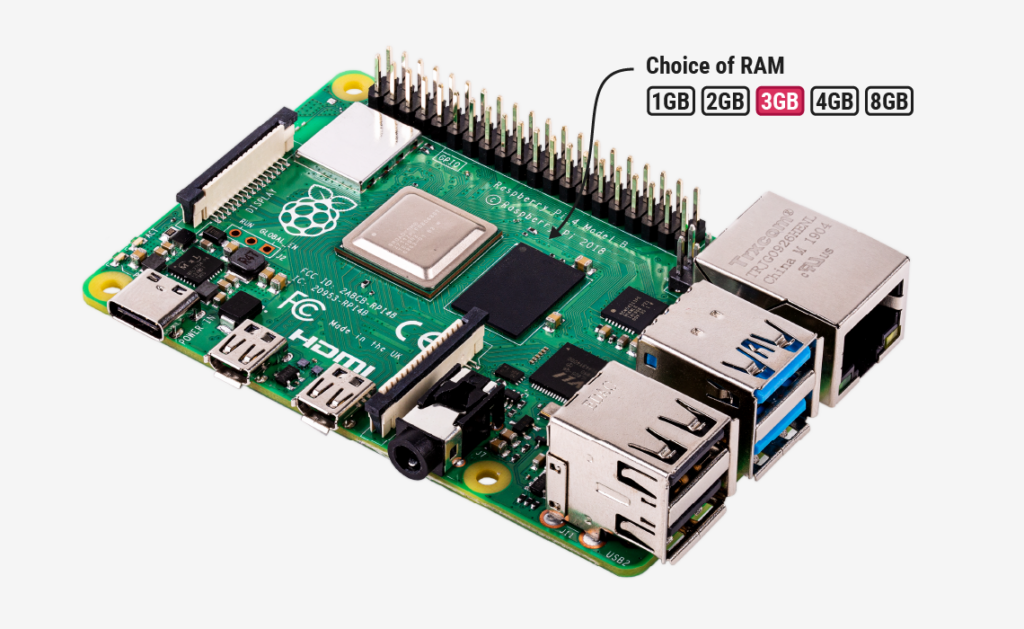 Raspberry Pi official blog: notice of price increases driven by memory costswww.raspberrypi.com
Still, when I picture the people actually buying these boards, I think the ones who want 16GB are a minority. Spinning up a lightweight web server, acting as a receiving end for data from IoT devices, being the first computer a child touches — something with a screen, that can browse the web, that can run a simple program. None of that needs performance anywhere near what edge inference demands.
To be fair, the 1GB Raspberry Pi 4 still sells for $35. That’s the same price as the original 2012 model with four times the memory, so if anything the board is holding up well. But exchange rates aside, $35 doesn’t feel real to someone buying it off a shelf in Japan. And if this same cost increase is going to keep hitting everything with DRAM in it going forward, it seemed worth reconsidering the idea of a “cheap and good enough” computer from scratch.
So I started thinking about it, and it turns out this doesn’t land anywhere easily.
The first idea I had was the obvious one: rebuild around a mature SoC paired with an older generation of DDR3. But once I looked into it, this idea had already stopped making sense. As DDR4 got fought over, production capacity got reallocated, and it turns out the smaller-capacity older generations like DDR3 and DDR2 are actually seeing supply shrink even more, with relatively larger price increases. The instinct that “older means cheaper” doesn’t hold anymore.
So, don’t use DRAM at all. On-chip SRAM is made on the same process as logic, so it rides on a different track from DRAM pricing. There are real microcontrollers with MB-class SRAM — NXP’s i.MX RT600 has 4.5MB, STM32N6 has 4.2MB — and with DRAM up sevenfold, the gap in cost-per-bit between SRAM and DRAM has narrowed by nearly an order of magnitude. Back in 2020, the argument would have ended with “you’d be cheaper attaching 256MB of external DRAM than putting in 4MB of SRAM.” Now, for the first time, that math is within reach. This seemed worth digging into.
NXP i.MX RT600 (up to 4.5MB on-chip SRAM)nxp.com
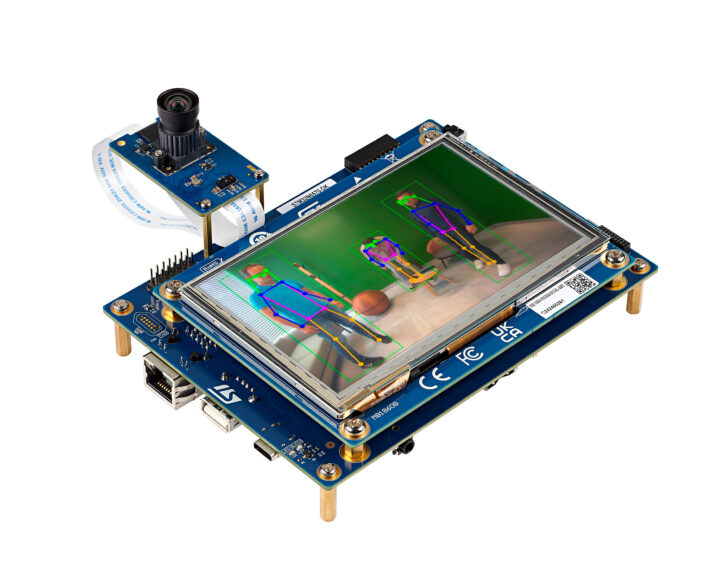 CNX Software: STM32N6 (Cortex-M55 microcontroller with 4.2MB of contiguous SRAM)www.cnx-software.com
But this idea falls apart on a single point: without OSS running on it, it won’t spread.
Taking existing OSS and running it effectively means accepting Linux’s memory model, and under Linux, the code of a running program sits entirely in RAM, page by page. The text segment of libc alone runs several MB, which eats up an MB-class SRAM by itself. Once a package manager and an ordinary userland are in place, the practical lower bound for required memory is 64–128MB. Meanwhile, SRAM uses 6 transistors per bit, an order of magnitude more die area than DRAM’s one-transistor-plus-one-capacitor cell. The reason there’s no cheap chip with 64MB of SRAM on board is that nobody can afford the area. There’s a gap of 4 to 10 times between the lower bound Linux requires and the upper bound that’s realistic to build in SRAM.
This isn’t something you can solve by choosing lighter software. That lower bound is set by the structure of Linux itself — page granularity, the page cache, and so on.
So, giving up on zero DRAM and dropping an order of magnitude instead. Sophgo’s SG2002 has 256MB of DRAM built into the same package, and you can buy it as a complete board for around $10 as the LicheeRV Nano or the Milk-V Duo 256M. Rockchip’s RV1106 also has 128MB or 256MB built in. Both are mass-produced parts aimed at IP cameras, and SoC vendors have locked in long-term contracts for small-capacity dies that neither phones nor PCs want, so prices move to the rhythm of SoC pricing and aren’t very exposed to spot-market swings. With 256MB, Python 3 runs fine, and pip works too. Node.js eats 40-50MB just starting up, so it feels workable for small apps, barely.
 Sipeed LicheeRV Nano (SG2002, with 256MB DDR3 built in)wiki.sipeed.com
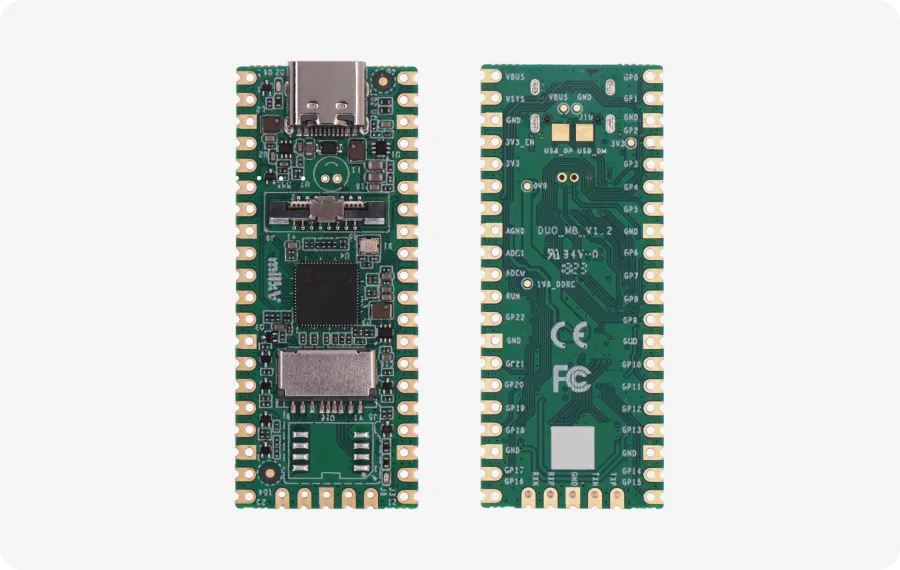 Milk-V Duo / Duo 256Mmilkv.io
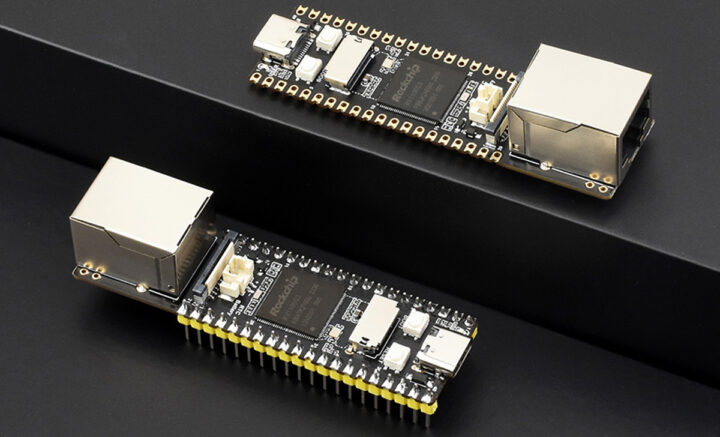 CNX Software: LuckFox Pico Pro / Pico Max (RV1106, with 128MB/256MB built in)www.cnx-software.com
Having looked this far, I noticed something.
Judging purely by price and performance, a “cheap and good-enough Linux machine” already exists on the market. The LicheeRV Nano and Milk-V Duo 256M with the SG2002, and the LuckFox Pico series with the RV1106 — all of them sit around $10-20, run Linux, support Ethernet, and run Python. For the use cases I mentioned at the start — a lightweight web server, a receiving end for IoT — the performance is already more than enough.
And yet these boards are not widely used as “the next $35 computer.” Thinking about why, the gap seems to lie outside the hardware itself.
With Raspberry Pi, the official OS image gets updated continuously over a long period, and the same setup steps work even on old boards. Search online and someone has already written an answer to nearly any question, even in Japanese, and there’s a mountain of textbooks and school materials. HATs and cases from third parties are, more or less, guaranteed to be available. Boards built on newer SoCs, by contrast, mostly rely on an OS image built from the vendor’s SDK, with documentation mainly in English or Chinese. How long updates continue depends to some extent on the staying power of comparatively small vendors, and sometimes the SoC itself goes out of production. In fact, the original Milk-V Duo stopped being manufactured when the CV1800B it was built on reached end of life, and users were guided to migrate to the Duo 256M and similar boards. This, I think, is a part of the ecosystem that still has room to mature.
In other words, the parts are already there. What’s missing is OS image maintenance, documentation, teaching materials, and the confidence that the same steps will still work five years from now. Building and maintaining that costs money. The original Pi’s $35 price point worked because it repurposed a set-top-box SoC and because a foundation backed the ecosystem for educational purposes. Redefining this means first deciding who pays for that part. And the supply risk around legacy DRAM hasn’t gone away, with the choices skewing heavily toward Chinese SoCs.
In short, as long as you’re trying to run Linux, DRAM pricing and supply remain a constraint you can’t escape.
So here I decided to question the premise itself a little. Why was Linux necessary in the first place? Because I wanted to bring over existing OSS as-is. Why did I want to bring it over? Because the cost of rewriting it myself was too high.
What if a human isn’t the one paying that cost?
Lately I have AI write most of my code, and in environments like ESP-IDF, where there’s a huge amount of documentation and public code, it works quite well. I’ve actually built things like a weather display and a fixed-point camera on an M5Stack by talking it through with AI. The premise that “without OSS running on it, it won’t spread” was paired with another premise: “it doesn’t pay for a human to rewrite existing code.” If the latter is starting to collapse, maybe the former is worth reconsidering too.
So I reset the conditions like this. Drop Linux. Don’t put in DRAM either. But keep the things that come standard on a Raspberry Pi — WiFi, Bluetooth, Ethernet, HDMI, USB. It only needs to work as a server, so nothing beyond that is needed. GPIO gets added via an expansion board like a HAT. Assume AI writes the programs, and rewrite every app on top of that runtime.
Under this condition, the most straightforward answer, I think, is a two-chip setup with the ESP32-P4 as the main chip and wireless handed off to the ESP32-C6. The P4 is a dual-core RISC-V chip, and it’s one of the few chips that has USB 2.0 High-Speed, an Ethernet MAC, MIPI-DSI, SD card support, and an H.264 encoder, all without external DRAM. HDMI comes out through a conversion chip from MIPI-DSI. Even adding a PHY, a hub, and passive components, the parts cost looks like it would land around $15.
And something very close to this configuration already exists. Waveshare’s ESP32-P4-Module-DEV-KIT combines the P4 and C6 with an RJ45 port, four USB ports, and a 40-pin header, and an overview article abroad described it as having nearly the same port layout as a Raspberry Pi — minus HDMI — while what’s inside isn’t a processor that runs Linux but a microcontroller. That’s exactly the position I’m looking for.
That said, the ESP32-P4NRW32 on this kit has 32MB of PSRAM built into the same package. Looking at the datasheet, the P4 comes in only two variants, 16MB and 32MB, both with PSRAM built in. PSRAM is DRAM internally, so as long as you’re using the P4, strictly speaking, this isn’t a zero-DRAM configuration. That said, the capacity is small, 16-32MB, an order of magnitude down, and the price is already folded into the SoC’s cost. Like the SG2002 I looked at earlier, it’s more accurate to call this a solution that drops an order of magnitude rather than one that removes DRAM entirely.
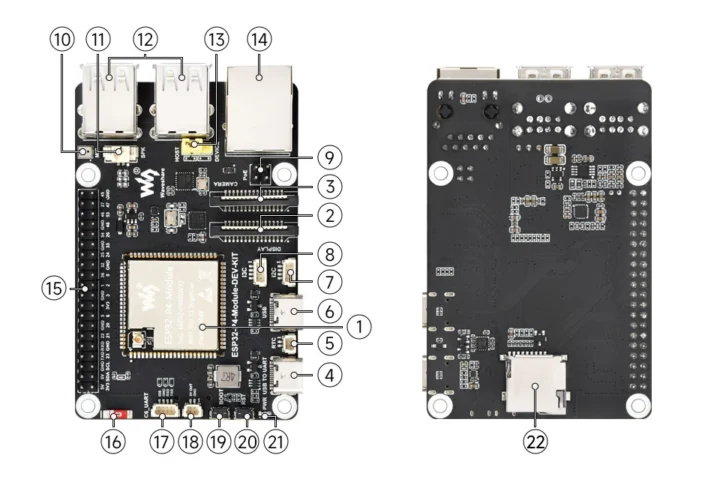 Waveshare ESP32-P4-Module-DEV-KITdocs.waveshare.com
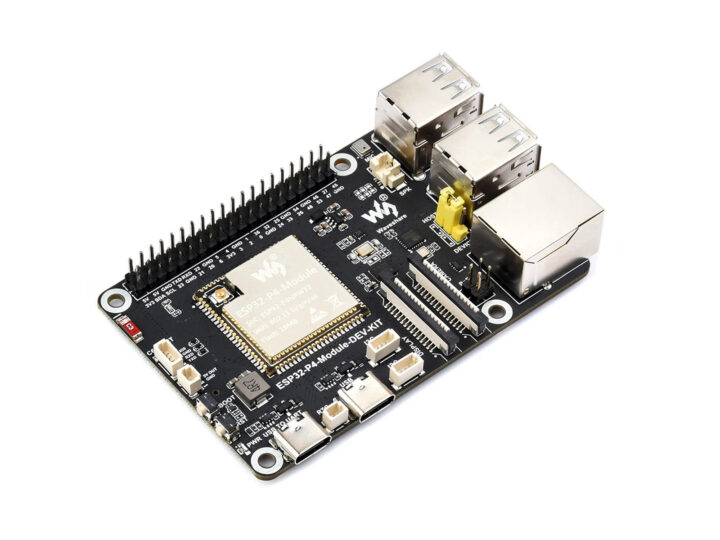 CNX Software: a credit-card-sized ESP32-P4 boardwww.cnx-software.com
As a yardstick for performance, the datasheet lists the P4 at a combined CoreMark of 2,489.62 across two cores running at 360MHz. The STM32H743, with a 480MHz Cortex-M7, scores 2,424, so the P4 is roughly on par with a Cortex-M7 (STM32H7 or Teensy 4.x). That’s the top tier for a microcontroller, but it doesn’t reach the level of a Cortex-A-based SBC. In practice, it’s like running two M33-class cores at a high clock speed.
So I took the crucial question — what can and can’t it do — and checked it off one by one against every use case I could think of.
An edge server that receives instructions from the cloud over WiFi or Ethernet and drives GPIO or Bluetooth. Yes. Hitting a web API, pulling data, reformatting it, and sending it to a webhook. Yes. A receiving end for collecting data over Bluetooth or GPIO. Yes. Running something like Tailscale to monitor a remote facility’s network. Tailscale itself won’t run, but a C implementation of WireGuard can substitute, so conditionally yes.
Pulling video from S3 and streaming it to a display over HDMI. No. A child with zero computer experience plugging in a mouse, keyboard, and display to browse the web. Also no. Both fail because there isn’t enough framebuffer, and more fundamentally, because there’s no browser rendering engine that runs on a microcontroller.
The browser is the one thing that just doesn’t seem achievable.
This is the latter half of the condition I mentioned at the start — a screen, browsing the web, for educational use — and honestly, it’s also the part that feels most essential to being a “$35 computer.” The real invention of the original Pi was covering server, tinkering, and education all on a single board. Once that premise no longer holds, I don’t think it’s realistic to bring the price back down while keeping that one-board-does-everything shape intact.
But there’s one thing that’s different between 2012 and now. In 2012, what was scarce was the computer itself. Now, phones and tablets sit around spare in every home and classroom. What’s actually scarce is a small server you can run under your own control. Leave the screen to whatever browser is at hand, and accept the box as a headless server. If the first computer a child touches is logging into their own personal server from a browser and running a program there, that could still be a reasonable entry point in its own right.
So that’s where things stand — I’m still in the middle of exploring this. What’s next is simple: get a P4 board running in front of me and measure how the HTTP server and the HDMI console actually feel to use. Once I have numbers, I’ll probably write about it again.
If anyone reading this is only using their Raspberry Pi as a server, I’d ask: did that use case really need Linux in the first place?
References
- Raspberry Pi official blog, “A new 3GB Raspberry Pi 4 for $83.75, and more memory-driven price increases”
- Electronics Weekly, “Raspberry Pi price hikes”
- Jeff Geerling, “DRAM pricing is killing the hobbyist SBC market”
- Espressif, “ESP32-P4 Chip Revision v1.3 Datasheet” (CoreMark figures, PSRAM-equipped variant lineup)
- STMicroelectronics, “STM32H743/753” (CoreMark figures)
- TrendForce, “DDR4 Reportedly Leads Legacy Memory Rally with Q1 Prices Up to 50%; DDR3 in Tight Supply”
- TrendForce, “Limited Capacity and Order Shifts Drive March Consumer DRAM Price Surge, Led by Sub-4Gb Products”
- TrendForce, “Consumer DRAM Shortages Extend to DDR2 Products with Contract Prices Expected to Continue Rising in 3Q26”
This piece was written with original concept and direction by Yuichiro Kuzuryu, and text by AI.
Originally published in Japanese at https://clazytech.com/2026/10/1845/. Translated with LLM assistance and reviewed before publication.